Automatically Translate a WordPress Site Using AI

Personalized content, friendly interfaces, and interactive themes help create engaging, accessible websites. But to truly reach a global audience, your website should speak your clients’ language.
Fortunately, translating your site into any language is getting easier, quicker, and more affordable thanks to AI translation in many translation plugins.
In this article
Why Translate Your Site?
English may be the main language used on the Internet, but that doesn’t mean it’s spoken and understood by everyone. It’s great to create a site anyone can understand, but that’s only one of many reasons why you should consider translating it.
Here are three other great reasons to consider translating your site:
Multilingual SEO Reaches More Potential Customers
A multi-language website gives you the upper hand in global markets by increasing your visibility online. Multilingual SEO not only ranks higher in Google searches. It also ranks higher in search engines that are popular in other parts of the world such as Bing and Baidu.
Showing up in searches in other languages is an easy way to get more exposure for your site. There’s no need to add new products or generate new content – you can do it by simply translating what’s already on your site.
Translated Checkout Processes Increase Sales
Once a potential customer can find you via search, a translated site increases your chances of landing a sale. Studies show that people prefer to obtain information and buy goods or services in their native language. It’s easier to feel confident making a purchase when you can read the product descriptions in your own language.
When you’re dealing with payments, it’s important to make the purchase process as seamless as possible. A translated checkout process makes it less likely that a client will abandon their cart due to confusion and uncertainty.
Translated Sites are Trustworthy
It comes down to more than just convenience – consumers are looking for businesses that they can trust.
Translated support and documentation show your customers that you’re dedicated to reaching them on a deeper level. It indicates to your clients that you have taken the time to customize your online services to meet their needs.
Once you gain a customer’s trust, they’re more likely to return to you for future purchases. This means that any upfront cost of translating your site can quickly pay you back in increased sales and customer loyalty.
What is AI Translation?
The rewards for translating your content are clearly well worth the time and effort. For most, however, it’s not a question of whether launching a multilingual site is beneficial. Instead, it’s a question of how to translate your WordPress website in a way that’s affordable and efficient.
Your competitors may choose not to translate their sites because:
- Professional translation is expensive
- Translating your site yourself is time-consuming
- What do you do if you don’t speak any other languages?
One solution is AI translation, powered by LLMs (Large Language Models). AI translation uses tools like ChatGPT, Claude, and Gemini to create highly accurate translations – often better than human translators, and traditional machine translation engines.
While AI is still in its early stages, plugins like WPML already achieve 99.5% translation accuracy with PTC (Private Translation Cloud), its AI translator for WordPress websites.
How AI Works with WPML
WPML’s PTC lets you automatically translate your website into dozens of languages without having to worry about translation quality.
Unlike traditional translation engines, PTC uses your entire website as context, creating personalized translations that use your custom terminology, formality, and language style. PTC essentially works like a human translator, first understanding what your website is about, and only then creating translations.
PTC also comes with a translation quality guarantee, letting you get a full refund if you’re not happy with its translations. In other words, if you feel PTC’s translations aren’t perfect – you’ll get your money back.
Now, with WPML’s latest release, you can also effortlessly translate your whole site automatically in minutes thanks to a new mode called Translate Everything. Plus, anytime you click “Publish” on a new page or edit an existing post, WPML gets to work, automatically updating the translations in the background.
With Translate Everything, you can automatically translate…
- Posts
- Pages
- Taxonomy
- WooCommerce Products
- Content from page builders
- and more!
Thanks to WPML’s translation memory, you never have to pay for the same sentence twice. Plus, with WPML, you own your translations – they’re saved in your own database, not in a translation plugin’s cloud.
How to Automatically Translate a WordPress Site Using Total Theme and WPML
With the right tools, you can translate your entire site in no time flat. To illustrate this, we’re translating a test site built using Total theme and WPML.
Total theme is multilingual-ready, meaning you can translate every part of it – from headers and footers to custom post types and more. It can help you get your business off the ground quickly, thanks to an integrated page builder, a vast library of demo sites, and a variety of theme customization options.
Total is also fully compatible with WPML, and thanks to a mutual commitment to ongoing compatibility, you can rest assured that any potential issues will be quickly resolved.
With Total and WPML, you can automatically translate your entire site in as little as 3 easy steps:
Step 1: Install & Configure WPML
To automatically translate your content, you need a WPML Multilingual CMS or Agency account. These account types include the String Translation add-on and Translation Management feature that are required for automatic translation.
After activating, WPML launches an intuitive setup wizard that allows you to:
- Choose your site’s languages
- Format your site’s URL format
- Share info about your site with PTC
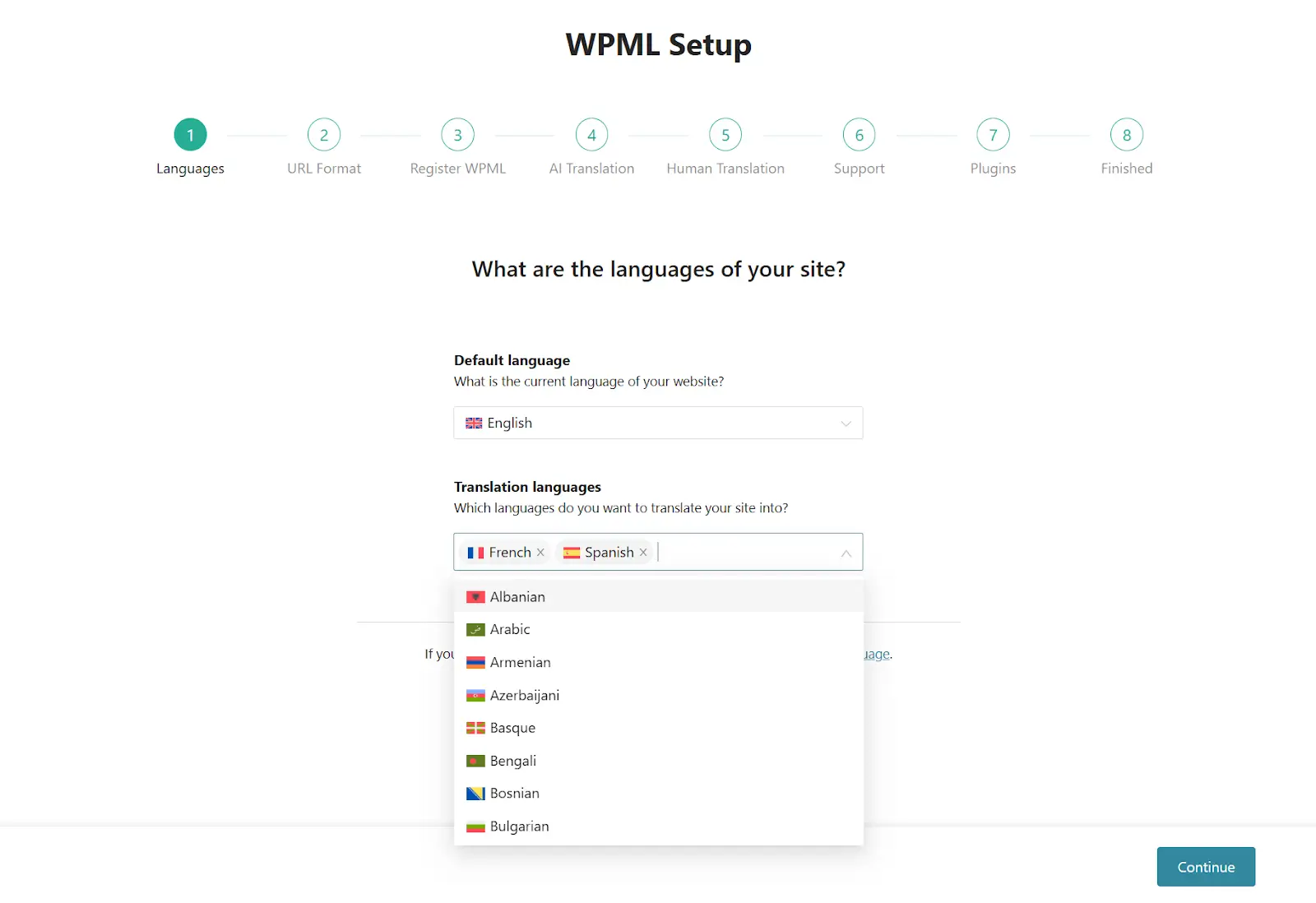
You can also install any other relevant WPML add-ons. For example, the WooCommerce Multilingual plugin allows you to add multiple currencies to your WooCommerce store and translate your products, product attributes and variations, cart and checkout process, and more.
Step 2: Send Content for Translation
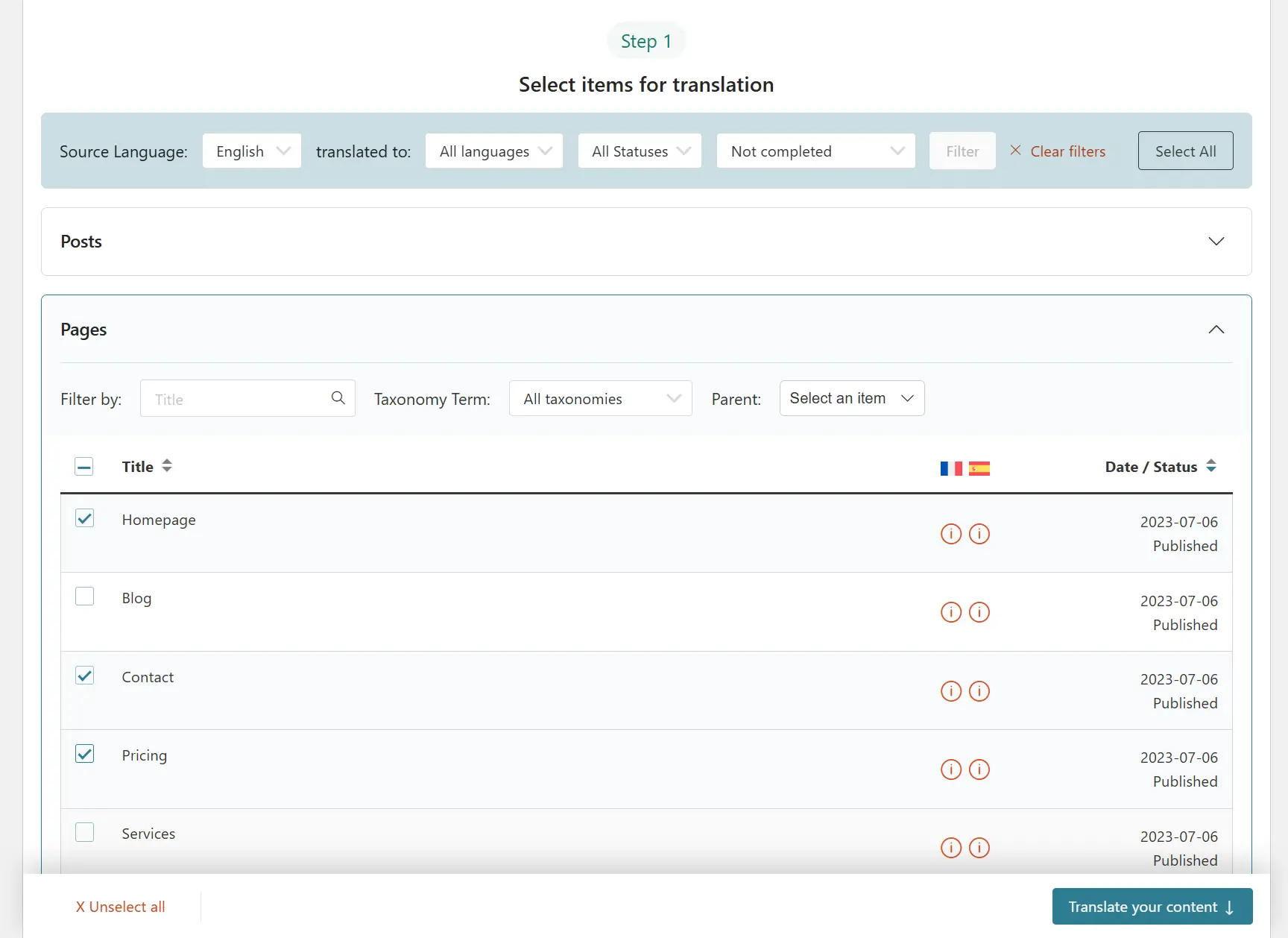
Once you complete the setup wizard, you’re ready to start translating your website. WPML offers an intuitive screen called Translation Dashboard where you can select what content to translate on your site.
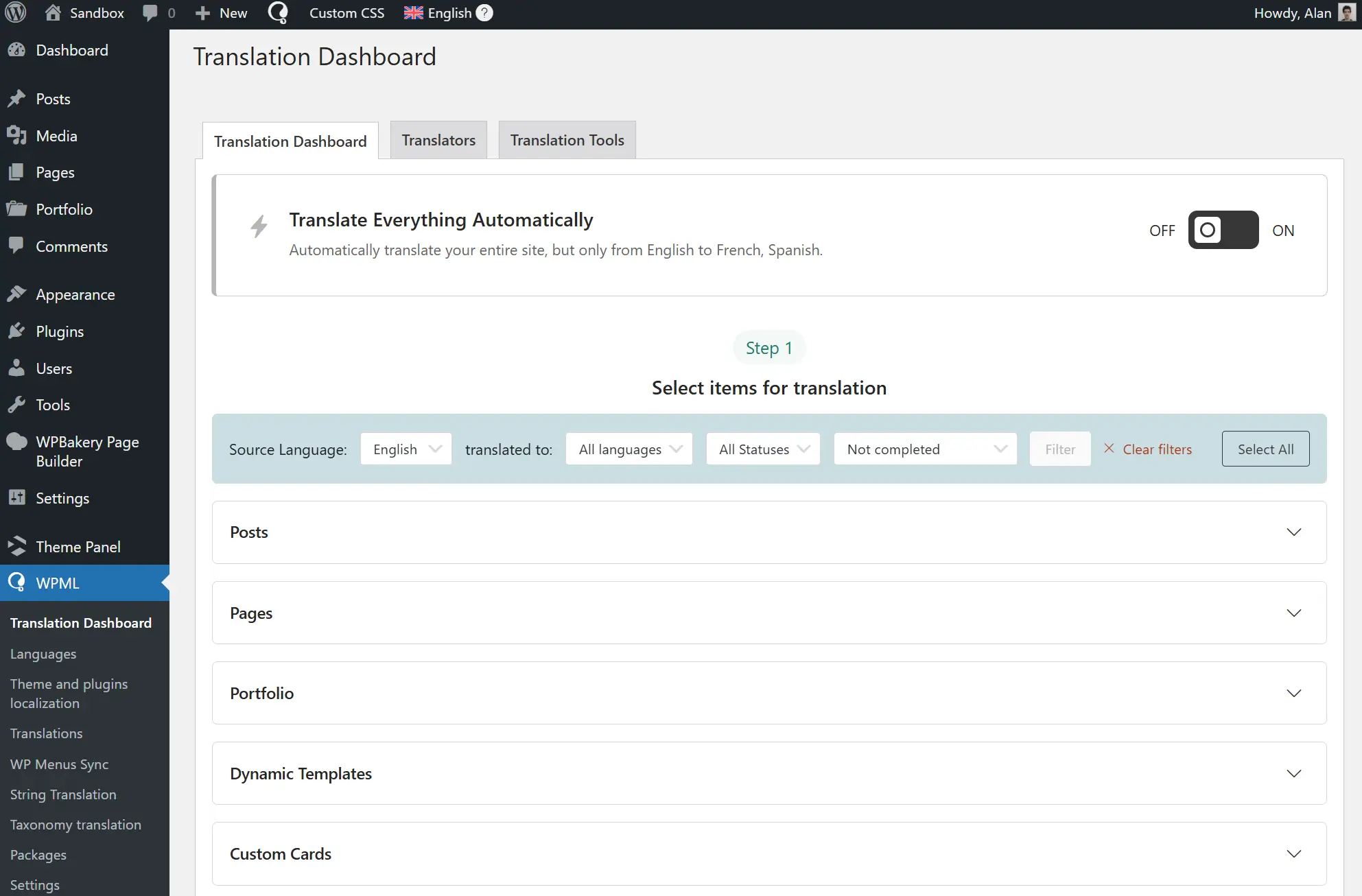
First, you need to select the items you want to translate. You can choose pages, posts, custom posts, WooCommerce products, and more.
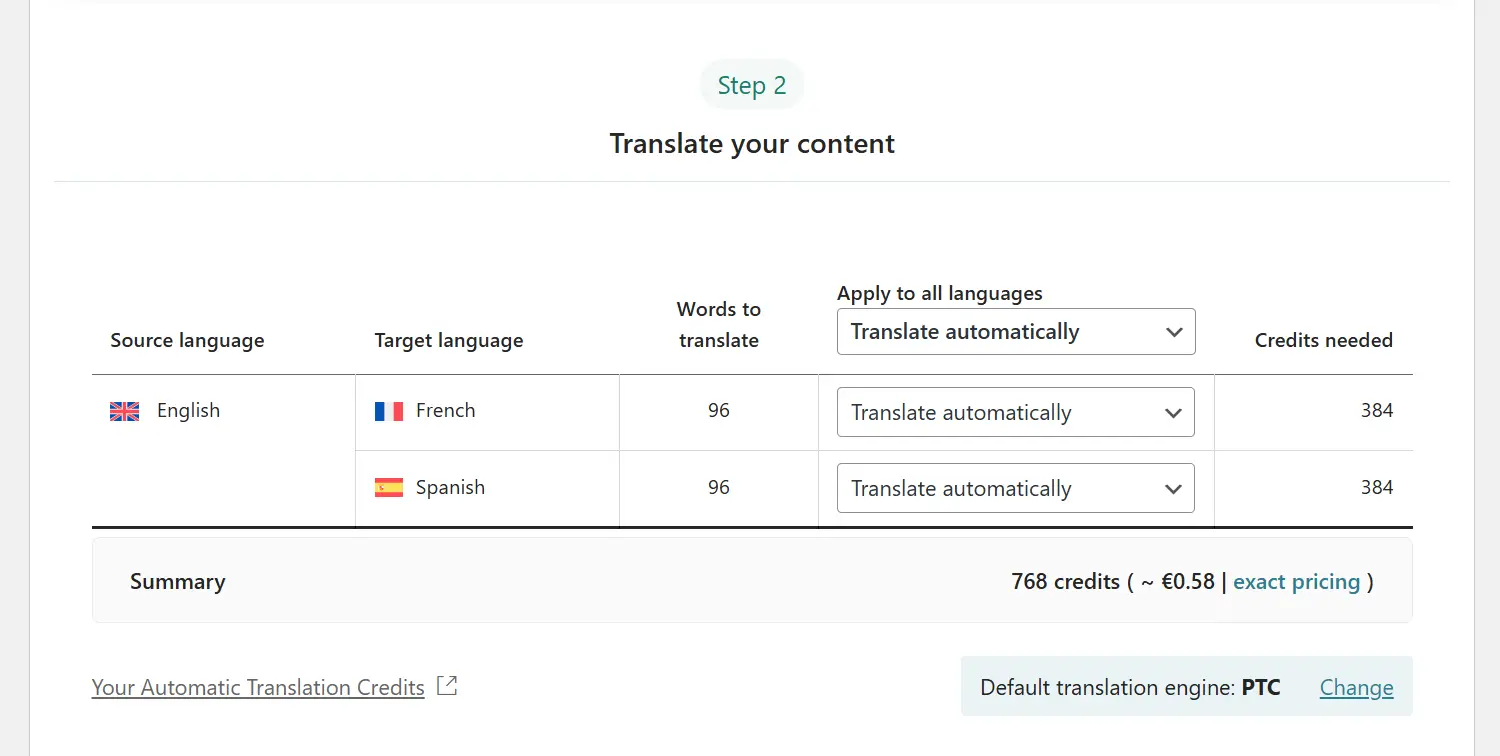
Next, choose Translate automatically and make sure PTC is set as your Default translation engine.
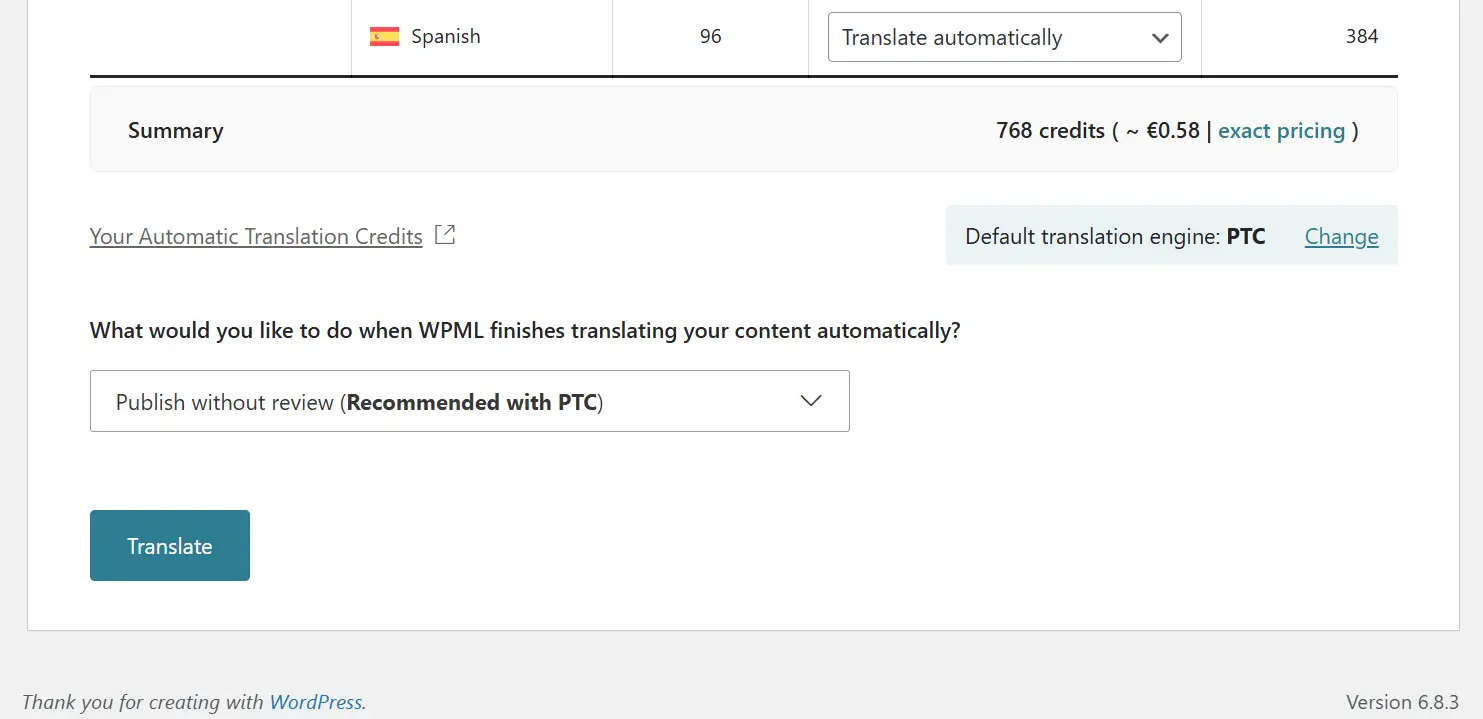
Finally, choose whether you’d like to review translations and click Translate. Since PTC can create excellent translations, reviewing them is optional.
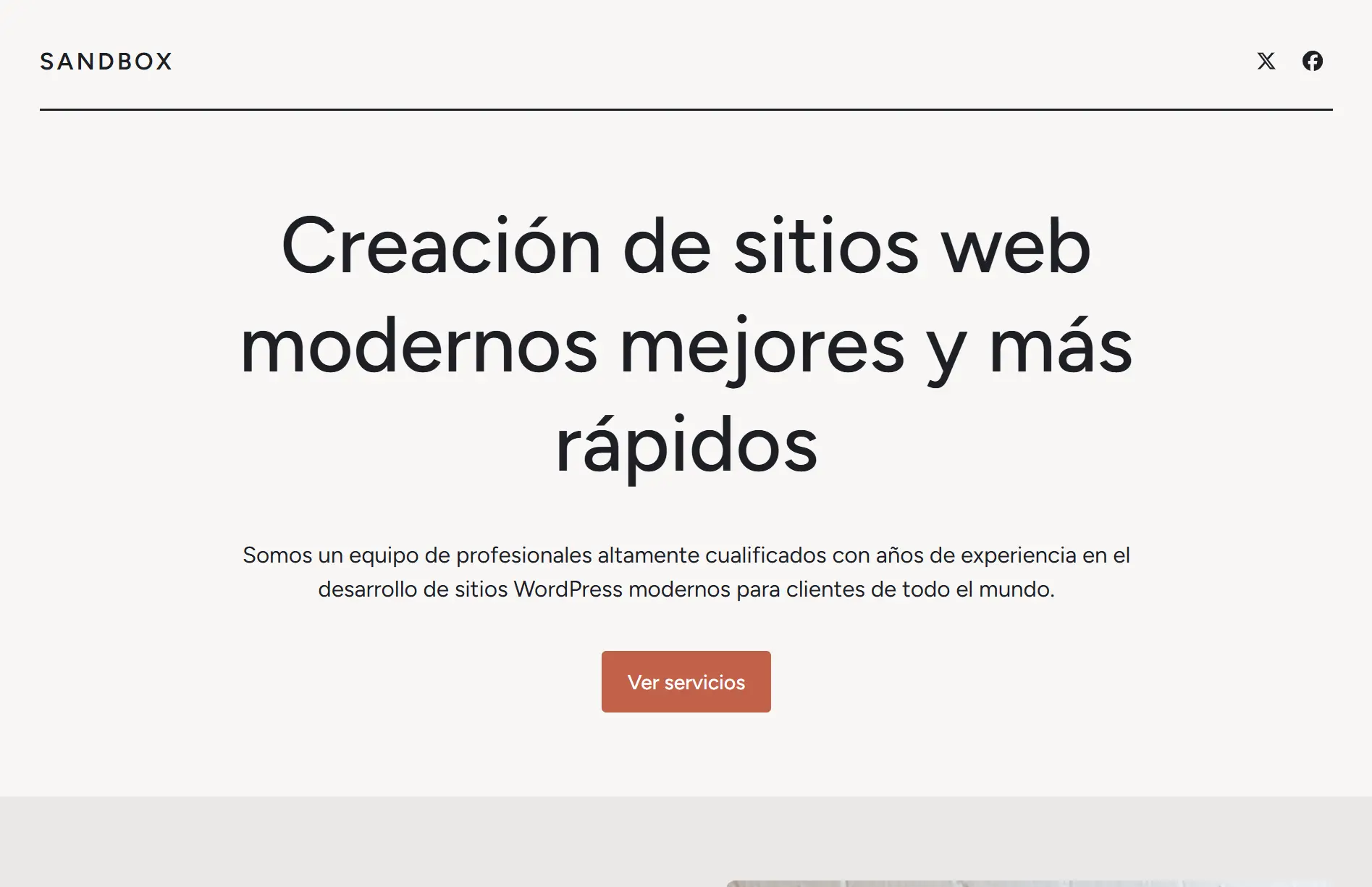
Once translations are ready, you can view them when switching languages on your website.
Step 3: Enable Translate Everything Automatically
Once you’re comfortable using PTC, you can enable the Translate Everything Automatically feature to create translations for your entire website. To do this, click the toggle at the top of the Translation Dashboard.
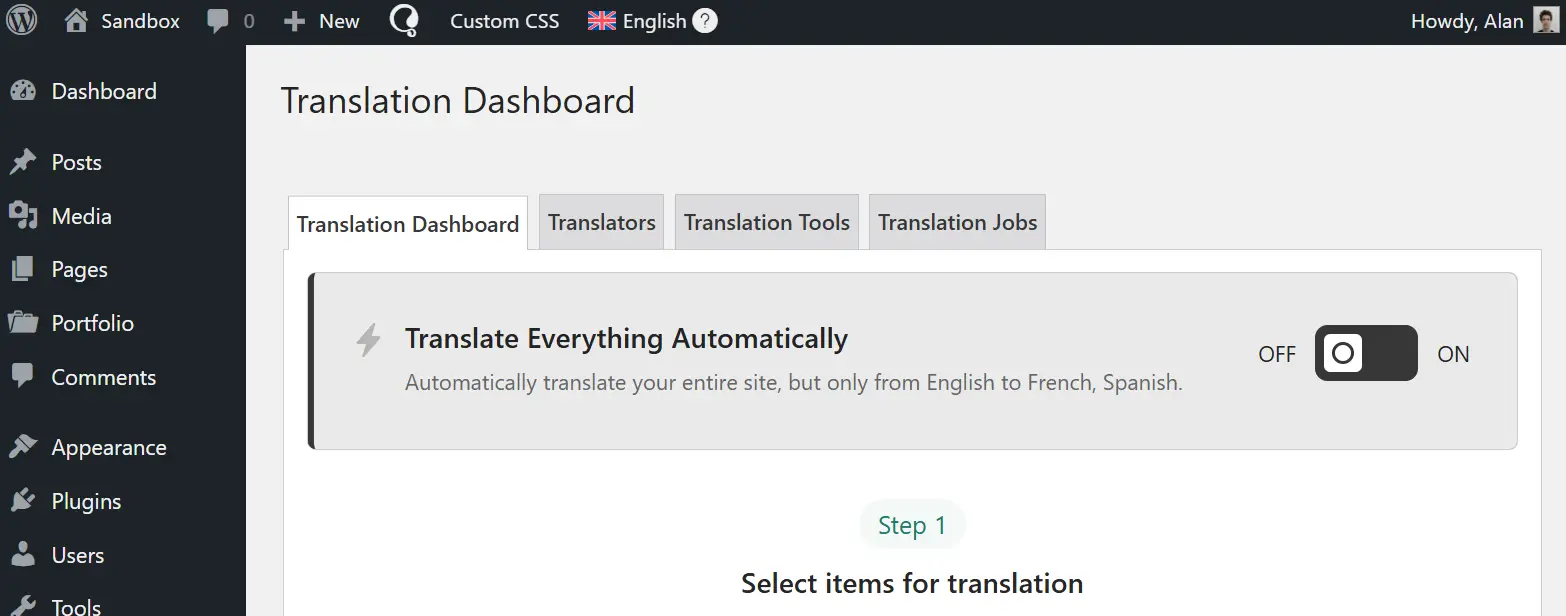
This will open a pop-up, where you can choose which content to translate; any existing untranslated content, or only new content you publish going forward.
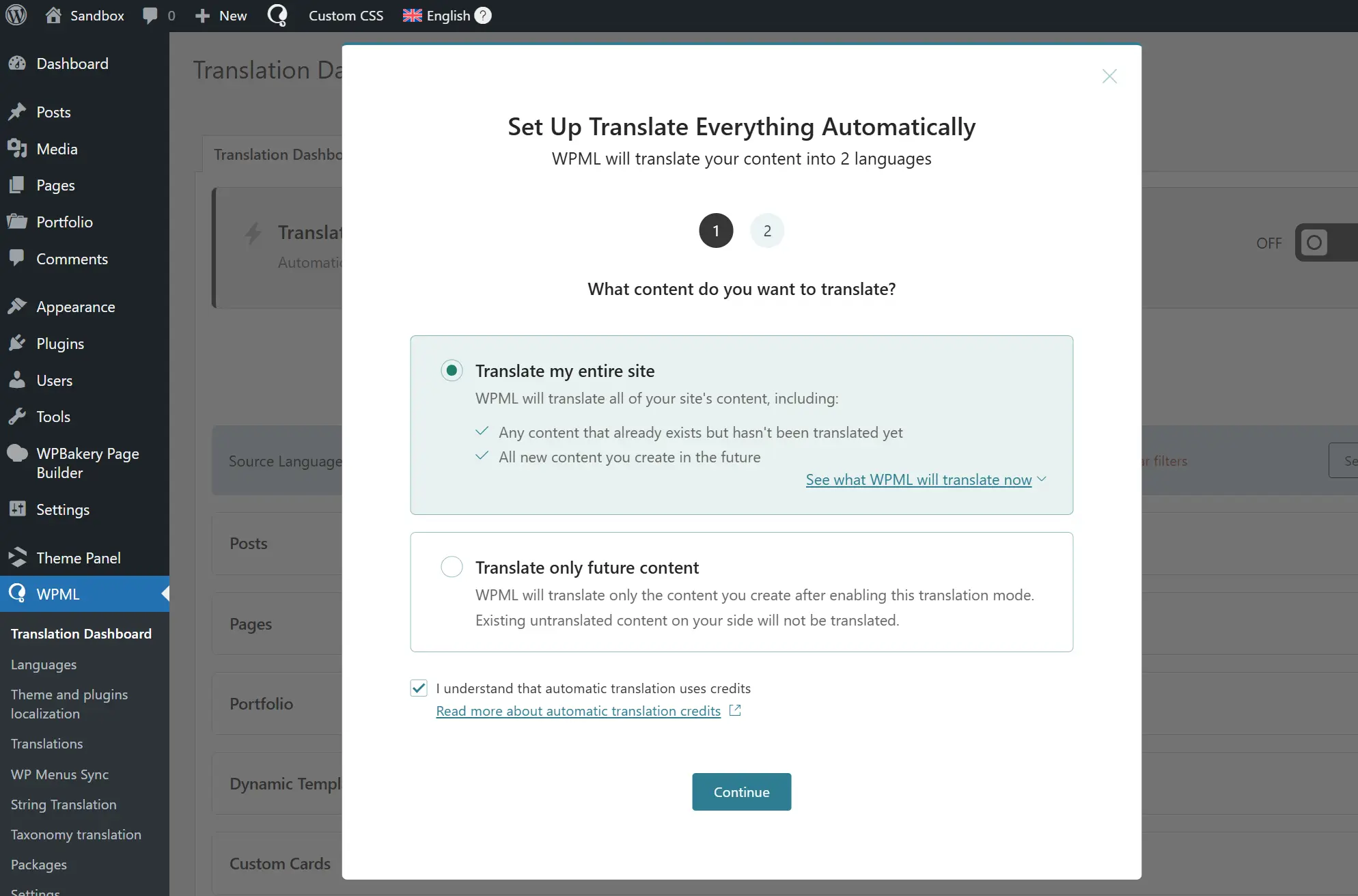
Once enabled, WPML will start translating your content, indicating the progress at the top of the dashboard.
Get Started With WPML AI Translations
And that’s it! In just 3 simple steps, you can translate your website into multiple languages, at a fraction of the time and cost it takes to translate manually.
Ready to translate your site with WPML? Visit the official WPML website to get started.