How to Re-Order WordPress Posts


Re-ordering your posts in WordPress is possible but it’s not very obvious how to do so. Sometimes you want to display posts using a custom order. Especially when working with custom post types for things like staff or portfolio items it may be important to display your posts in a specific order.
In this tutorial I’m going to provide you with different methods you can use for re-ordering your posts. If you are simply looking for a plugin to custom sort your posts you can skip to the recommended plugin.
Method 1: Update Your Query Block or Builder Element
Before actually going and manually sorting your posts you may be able to re-order your posts by simply editing your site. If you are working with posts displayed on a page via Gutenberg or another page builder you can re-order your posts by simply updating the element.
Need a Custom Order? Note: If you need to order your posts using a completely custom order then skip to the next section by clicking here.
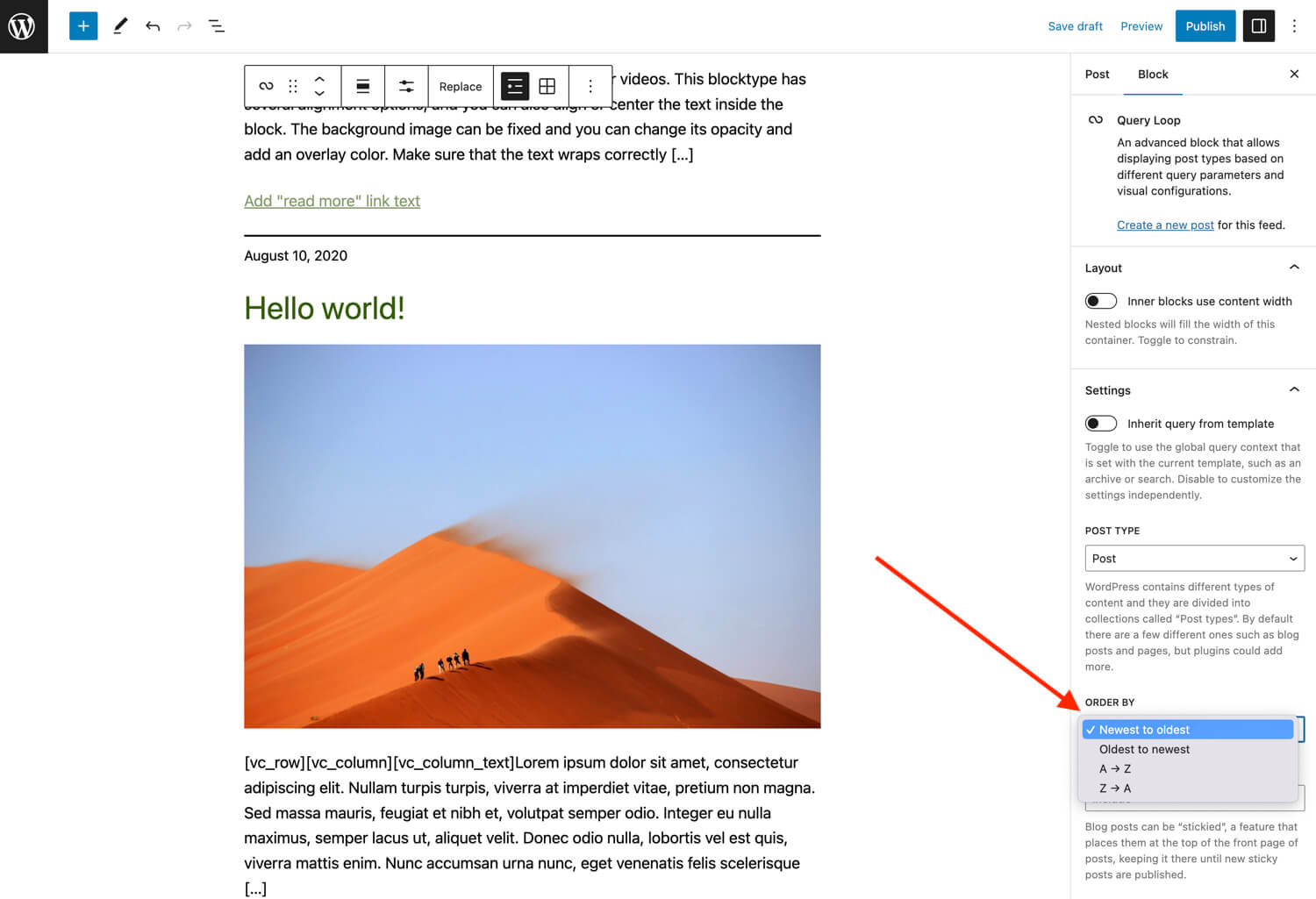
Gutenberg Query Block Order By Setting
If you are using the Gutenberg Query Block you can easily re-order your posts by changing the “Order By” setting. Unfortunately the WordPress Query block will only allow you to order your posts by date or title.
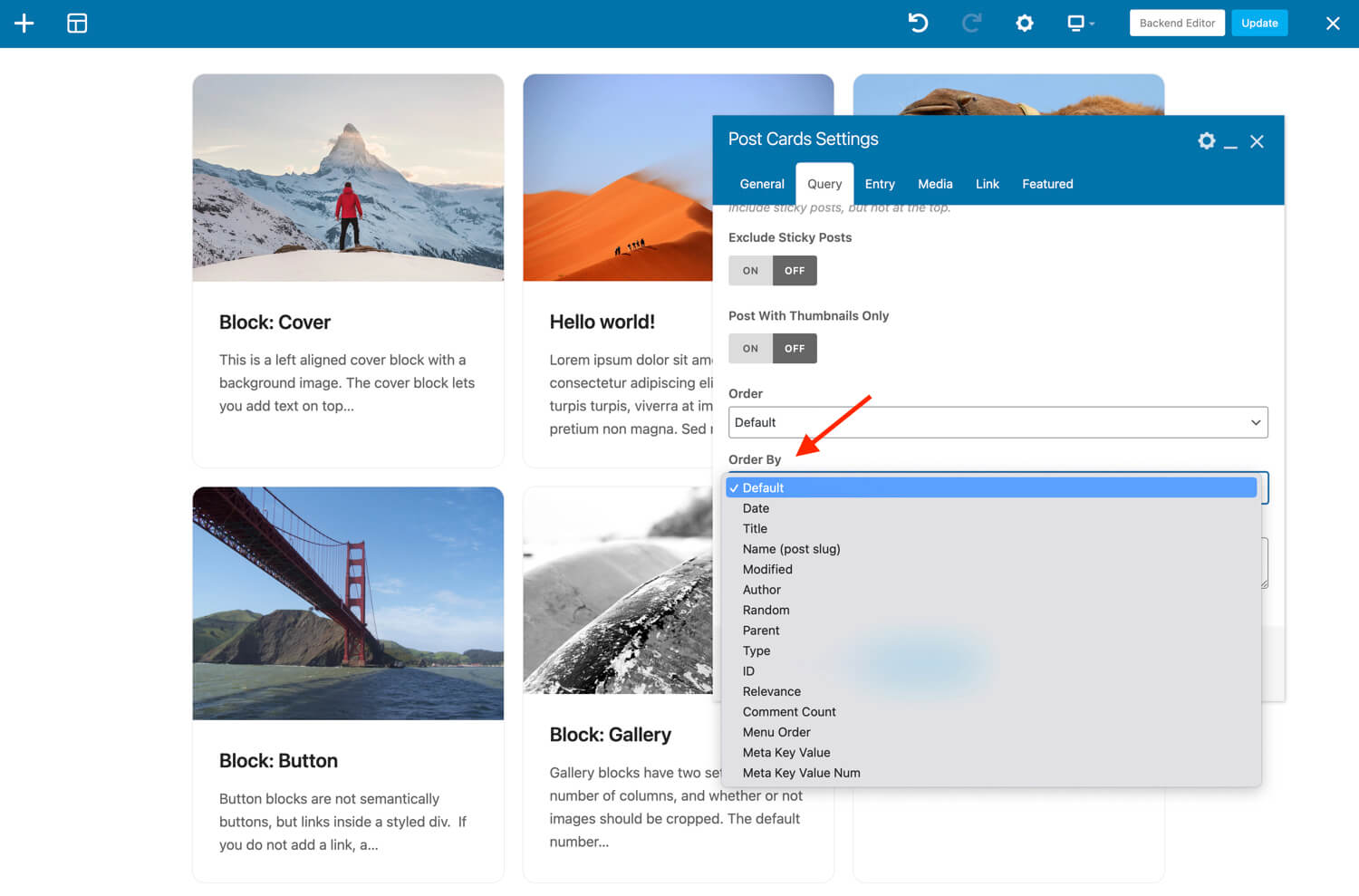
Total Theme Post Cards Order By Setting
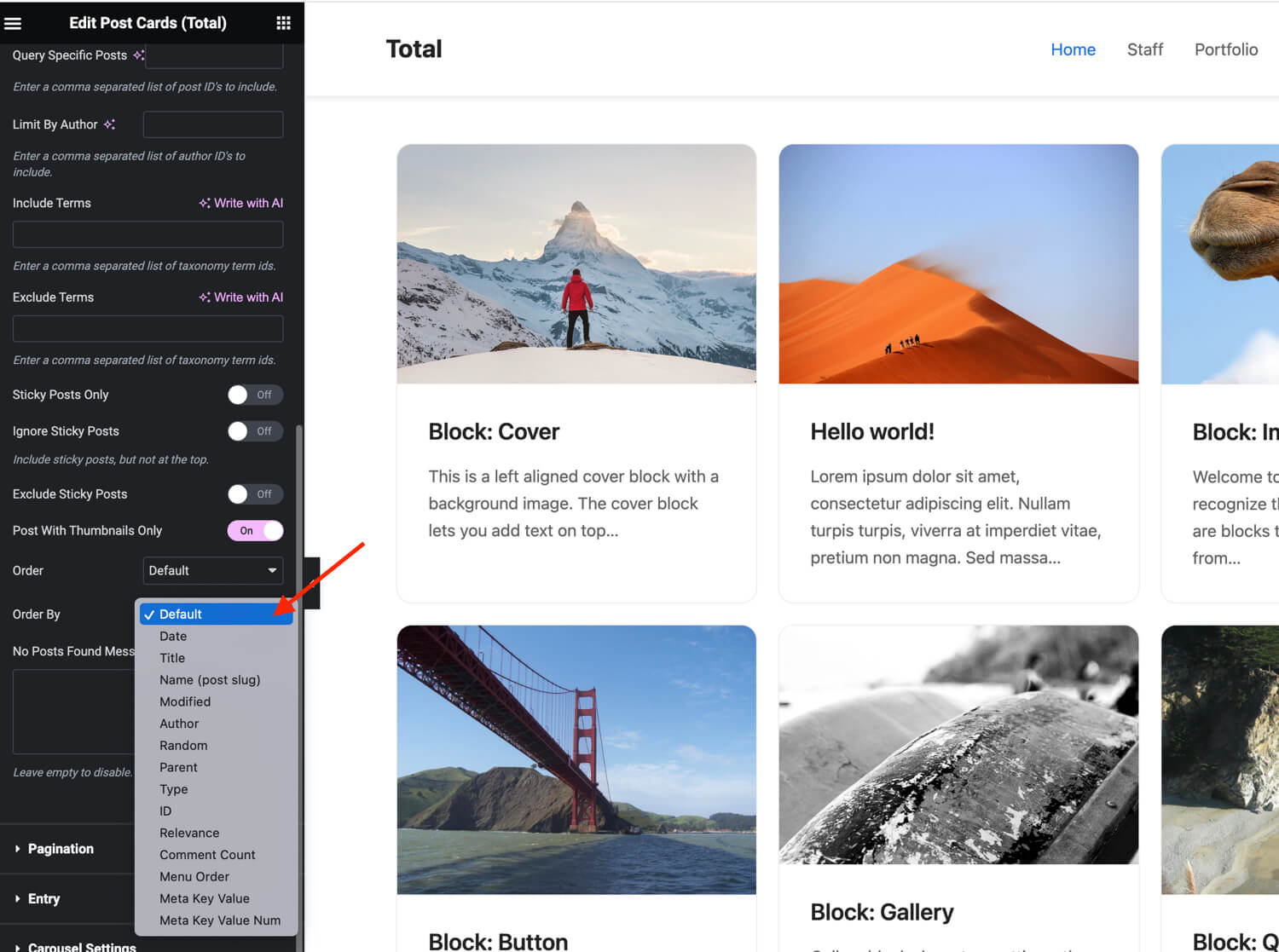
If you are using our Total theme (you should) our Post Cards element includes an “Order By” setting which can be used to sort your posts by date, title, name, modified date, author, random, parent posts, type, id, relevance, comment count, menu order, meta key value or meta key value number.
Here is a screenshot using the WPBakery Page Builder:
Here is a screenshot using Elementor:
Method 2: Change the Published Date
If you are looking to re-order your posts in a custom order the first method you can use is to change published dates of your posts. Since the default ordering for posts in WordPress is based on the published date (newest to oldest) changing your dates will generally change the order of your posts.
To alter your post date go to the WordPress backend and go to the post type you want to order, hover over the post you want to edit, click the “quick edit” link, alter the date then click “update”.
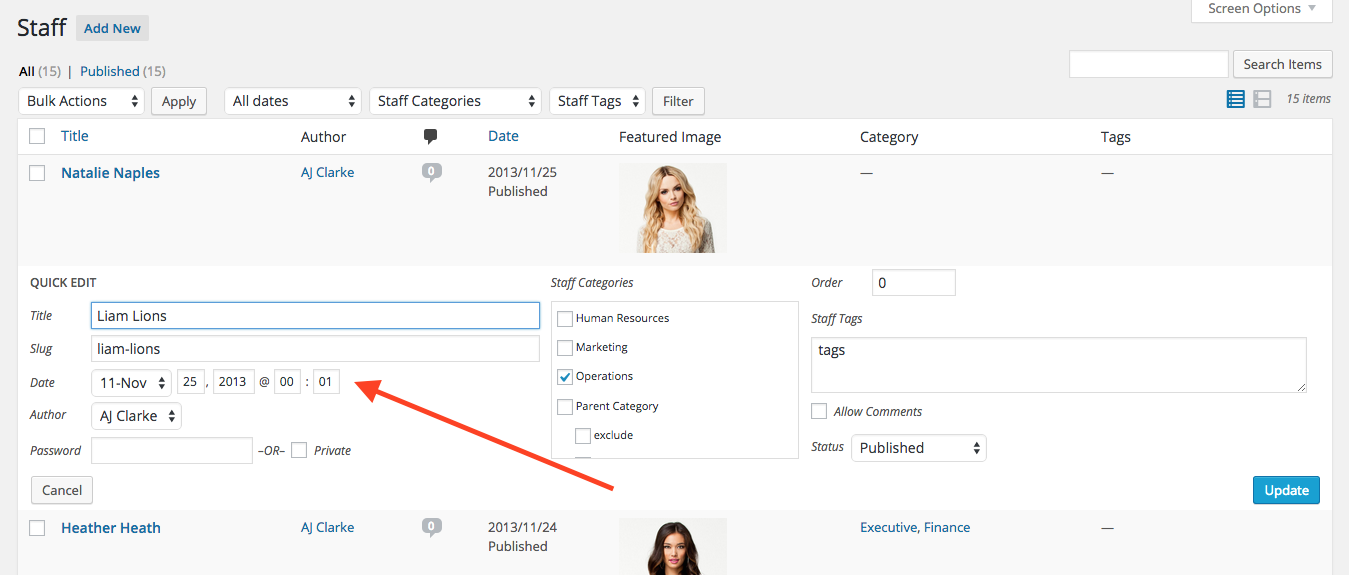
If you are using this method I would recommend choosing a specific date and then changing all your other posts to use the same date and just increase the time by a second. This will make it easier if you have many posts and as you add new ones.
Important: While it may be very tempting to change your published date to re-order your posts, I don’t personally recommend it for SEO reasons. If you are using an SEO plugin on your site (you should) the published date is going to be inserted into the HTML inside a meta tag with a property value of “article:published_time”. If you are manually changing your published dates it could negatively affect your SEO.
Method 3: Change the “Menu Order” Position
WordPress has a built-in post field named “menu_order” that can be used to re-order your posts. To set the menu order go to your dashboard and click on the post type you want to edit, hover over the post you want to edit, click the “quick edit” link, alter the order field then click “update”.
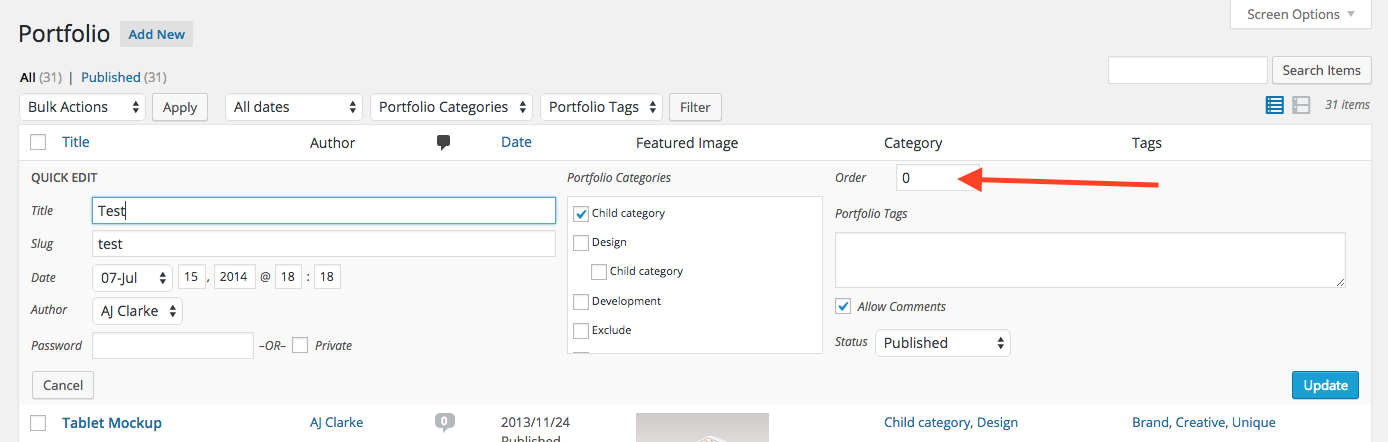
Note that whenever you create a new post it will have a menu order of 0 by default so you will need to edit the menu when you publish a new post so it’s placed in the correct position.
Can’t see the Order Field? This field is hidden by default for posts and custom post types but enabled by default for pages. If you are working with a plugin or theme that is registering the custom post type you’ll need to contact the developer so they can enable it. If you are using our awesome Post Types Unlimited plugin all you need to do is enable “Page Attributes” for the “Supports” setting.
Update Your Site to Use Menu Order
Unlike changing the published date of your posts which will usually update your order on the front-end, changing your menu won’t actually do anything unless you set your site to sort your posts by menu order.
If you are working with element on your site via a page builder such as Gutenberg, WPBakery or Elementor then you can simply edit your element and change the menu order (see method 1 above). Unfortunately at the time of writing this article the WordPress “Query” block doesn’t support ordering your posts by menu order, but perhaps the element you are using does, if not check out the snippet below.
If you are trying to sort the default order of your posts that are being shown either by your theme (homepage, archives, search, categories, tags, etc) or an element that doesn’t allow you to change the order to menu order, then you will need to use a little custom code. Example:
/**
 * Hooks into pre_get_posts to modify frontend queries.
 */
function wpexplorer_pre_get_posts( $query ) {
    if ( is_admin() || ! $query->is_main_query() ) {
        return;
    }

    $query->set( 'orderby', 'menu_order' );
    $query->set( 'order', 'ASC' );
}
add_filter( 'pre_get_posts', 'wpexplorer_pre_get_posts' );
In this example it will change the sorting of ALL your frontend queries. You may need to modify the code to only target the specific sections of your site or post types that you want to sort.
Method 4: Use a Post Order Plugin (recommended)
The easiest way to custom order your WordPress posts is going to be using a plugin. I’ve personally used and recommended the Post Types Order plugin for many years now. I’ve never had any issues with the plugin, it’s always worked great and never experienced any bugs with it.
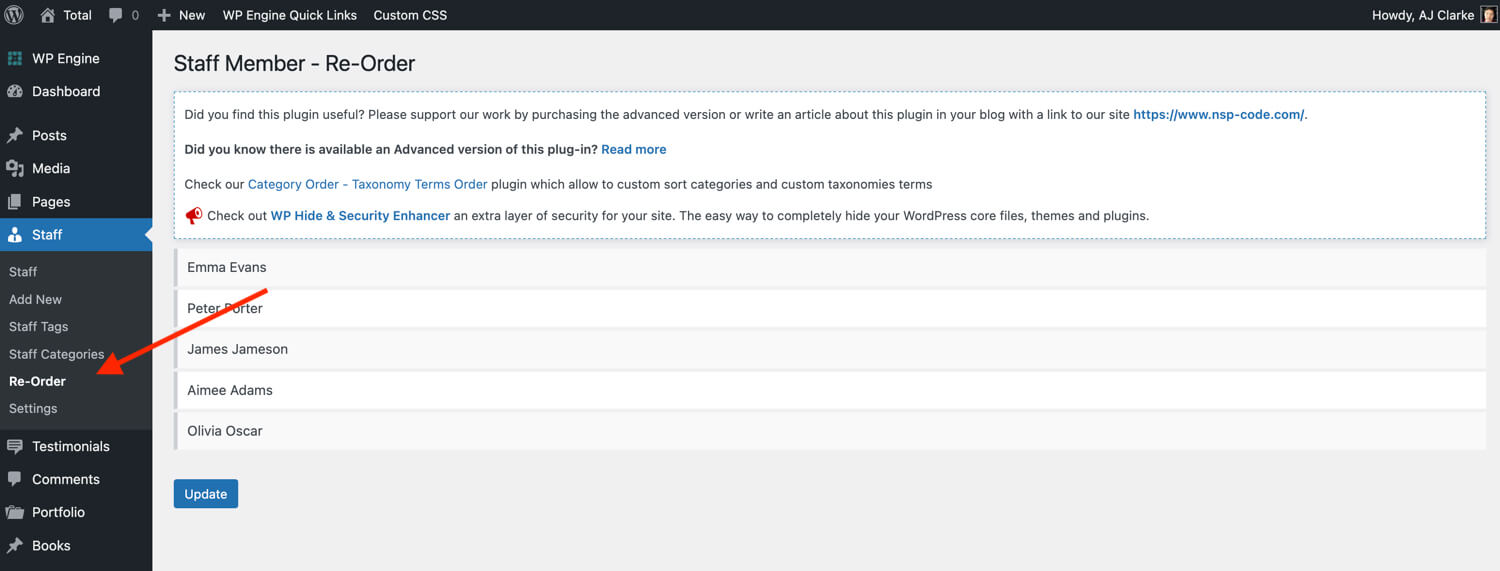
To use the plugin simply log into WordPress go to Plugins > Add New and search for “Post Types Order“, locate and install the plugin. Once installed and activated you can go to any post type and you will find a new “Re-Order” menu item that you can click on and it will take you to a page where you can drag and drop your posts to re-order them.
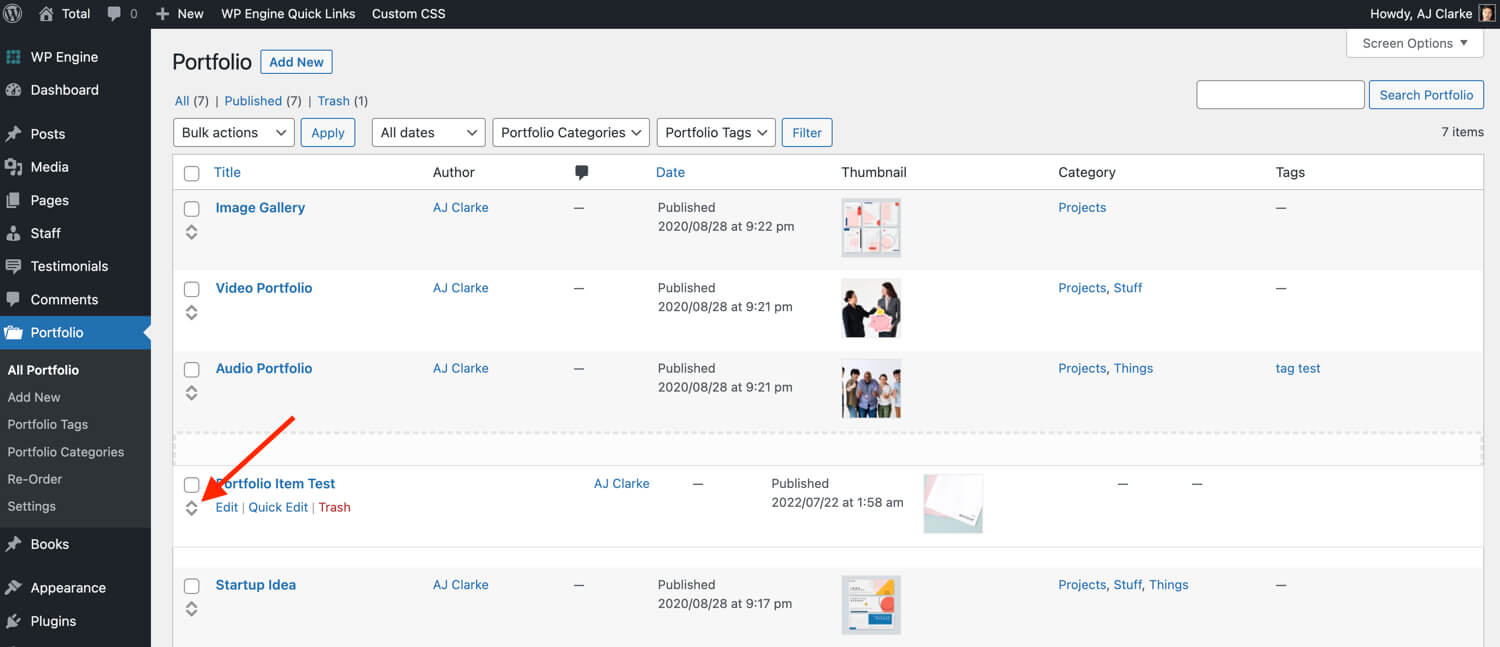
You can also go to the post type dashboard and re-order your posts by clicking the little sort icon and dragging them around:
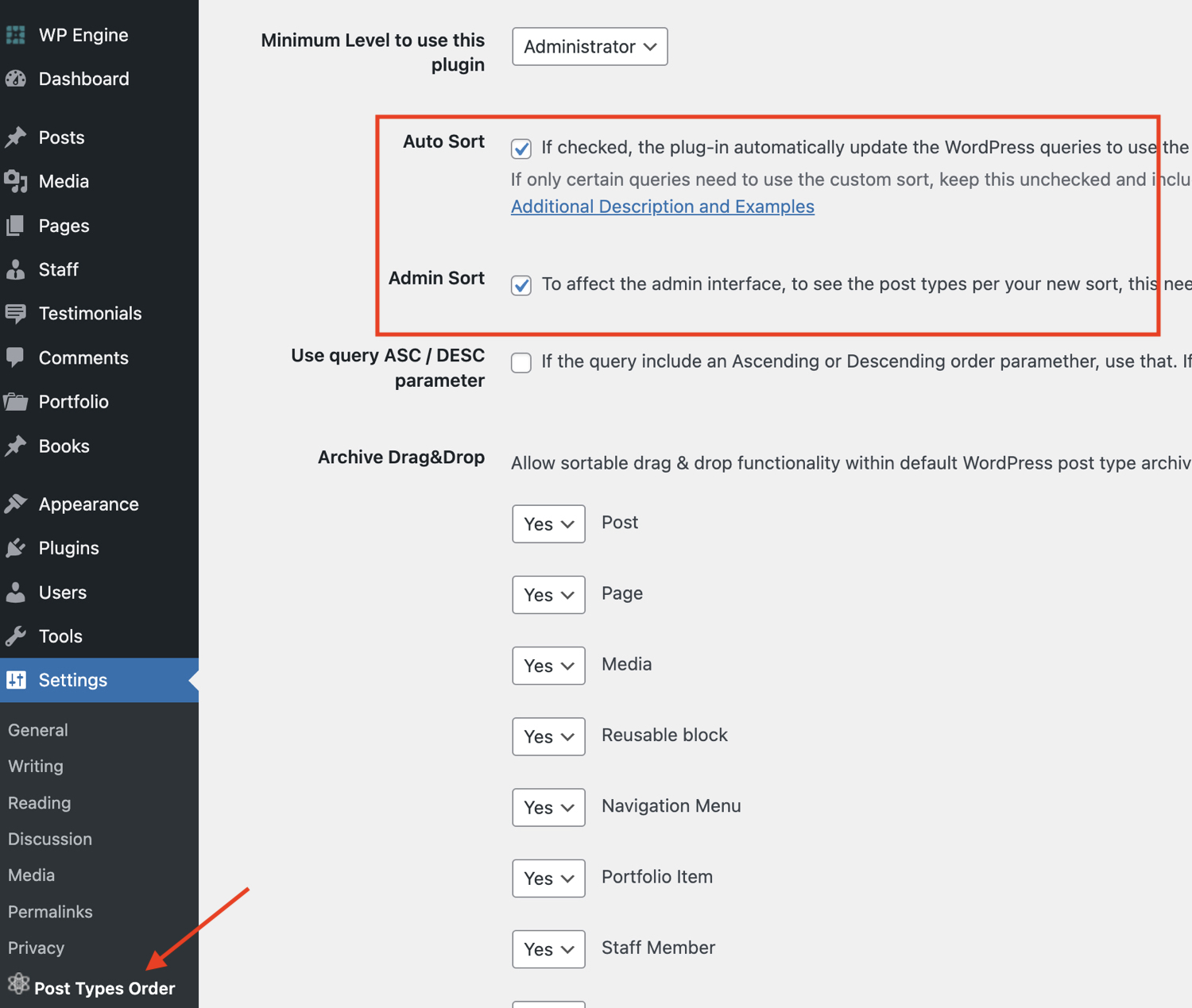
After you sort your posts the plugin will automatically sort them in the admin and on the frontend for you. If you prefer to not sort your posts automatically or they aren’t being sorted you will want to go to Settings > Post Types Order and set the Auto Sort field to your desired value:
Using the Post Types Order Plugin is the easiest way to sort your posts but also because it uses the WordPress menu_order field. This means that if you ever delete the plugin you won’t technically “lose” your custom order. You can always use a little code or another plugin that also uses the menu_order field to set your queries to make use of the previously set order.
Method 5: Re-Order Posts with Custom Code
If you want to re-order your posts using code instead of a plugin you can do so by hooking into the core WordPress pre_get_posts action hook. Below is an example showing how to change the default ordering of your posts by title.
/**
 * Hooks into pre_get_posts to re-order our posts.
 */
function wpexplorer_pre_get_posts( $query ) {
    if ( is_admin() || ! $query->is_main_query() ) {
        return;
    }

    $query->set( 'orderby', 'title' );
    $query->set( 'order', 'ASC' );
}
add_filter( 'pre_get_posts', 'wpexplorer_pre_get_posts' );
This example will modify ALL queries on the front-end of your site so that they are sorted by title in ascending order. You can change where it says “title” to be any “orderby” value you want from the ones available in WordPress. And of course you can modify the snippet if you wanted to target a specific archive, page or post type.
Order By Values
Here is a table showing all the order by values currently (at the time of updating this post) available in WordPress:
| Value | Description |
|---|---|
| none | No order. |
| ID | Order by post id. Note the capitalization. |
| author | Order by author. |
| title | Order by post title. |
| name | Order by post name (post slug). |
| type | Order by post type. |
| date | Order by date. |
| modified | Order by last modified date. |
| parent | Order by post/page parent id. |
| rand | Random order. Important: This order is NOT recommended as it can greatly slow down your site and won’t work with caching. |
| comment_count | Order by number of comments |
| relevance | Order by search terms in the following order: First, whether the entire sentence is matched. Second, if all the search terms are within the titles. Third, if any of the search terms appear in the titles. And, fourth, if the full sentence appears in the contents. |
| menu_order | Order by Page Order (Order field in the Edit Page Attributes box) and for attachments (the integer fields in the Insert / Upload Media Gallery dialog), but could be used for any post type with distinct ‘menu_order’ values. |
| meta_value | Order by a meta (custom field) value. Note that a ‘meta_key=keyname’ must also be present in the query. |
| meta_value_num | Order by numeric meta (custom field) value. Note that a ‘meta_key=keyname’ must also be present in the query. |
| post__in | Order by the value of the post__in query parameter. |
| post_name__in | Order by the value of the post_name__in query parameter. |
| post_parent__in | Order by the value of the post_parent__in query parameter. |
Re-Ordering Posts in WordPress is Easy!
As you can see there are many ways to re-order your posts and it’s very easy to do. There are also many different ways to order your posts wether it’s by date, title, custom field or custom order.
I mentioned above that I personally like to use the Post Types Order plugin for custom sorting when I need to specifically control the order of items. It’s simple and does a good job, although I’m not a huge fan of the giant promotion box that shows up at the top of the admin pages.
Let me know in the comments what method you prefer for changing the order of posts on your site and if you have a preferred plugin to use to drag and drop your posts to re-order them. Also if you need any help with a custom snippet let me know!



Hi man, how do i insert fotos to the default image gallery???
I don’t really understand the question…What theme? What are you trying to do?
Hi! How to do the same with categories? Is it possible to rotate it in the theme Office Responsive Business Theme
Found Plugin Category Order and Taxonomy Terms Order. I think this is the answer to my question
Yes it is 😉
Thank you so much!!! I’ve been looking for a solution for that for ages, and you gave a quick and simple answer, AWESOME!
`Method 3: Using the pre_get_posts Filter` – can I integrate custom fields there?
Sure.
Just huge thanks!
First method seems to be the only method which can be used by an ordinary people without any technical background and the simplest in case one need to order custom type posts 🙂
Great snippet thanks! But what is the “exit out if it’s the admin or it isn’t the main query” there for?
On second thought, that really is self explanatory 😉 so feel free to disregard…using it on the Total theme now!
i can’t get the quick edit back. please is that cuz they updated? how do i get back to the quick edit? That’s how i used to do it but can’t get to it again!