The Most Common Onsite WordPress SEO Mistakes

WordPress is pretty well optimized for search engines out of the box, but it isn’t perfect. There are many common onsite WordPress SEO mistakes that users make. More specifically, WordPress needs a bit of a helping hand in two areas:
- Additional functionality in the form of a SEO plugin.
- The effective application of onsite SEO measures.
Ultimately, you are responsible for how well-optimized your site is for search engine results pages (SERPs). If you’re not following basic SEO fundamentals, any plugins or widgets you have installed will be of little use.
With that in mind, I have written this list of the most common WordPress SEO mistakes, along with guidelines on how to avoid them.
First we’ll focus on mistakes specific to individual posts and pages. Then on errors that can have ramifications across an entire website. E.g. the kind of issues that can have a major impact on your site’s ability to rank for relevant keywords. If you find that your site is victim to some of these errors, rectifying them may make a dramatic difference to the flow of search engine traffic to your WordPress site.
So let’s get started!
- Not Optimizing Your Permalink
- Not Optimizing Your Post’s SERPs Presentation
- Poor Interlinking
- Poor External Linking
- Poor Image Optimization
- Poor Categorization and Tagging
- Poorly Structured Headers
- Instructing Search Engines to Index Too Much
- Not Providing an XML Sitemap
- Focusing on Meta Keywords
- Not Focusing on LSI Keywords
- Duplicate Content (and Not Defining Canonical URLs)
- Leaving Thin Content
- Not Optimizing for Speed
- Not Optimizing for Social Media
- Never Ever Updating
1. Not Optimizing Your Permalink
Your permalink is good for two things:
- Giving visitors to your site an indication of what a page is about.
- Indicating relevancy to search engines.
As such, you should ensure that your permalink structure is defined correctly in Settings > Permalinks on your backend:
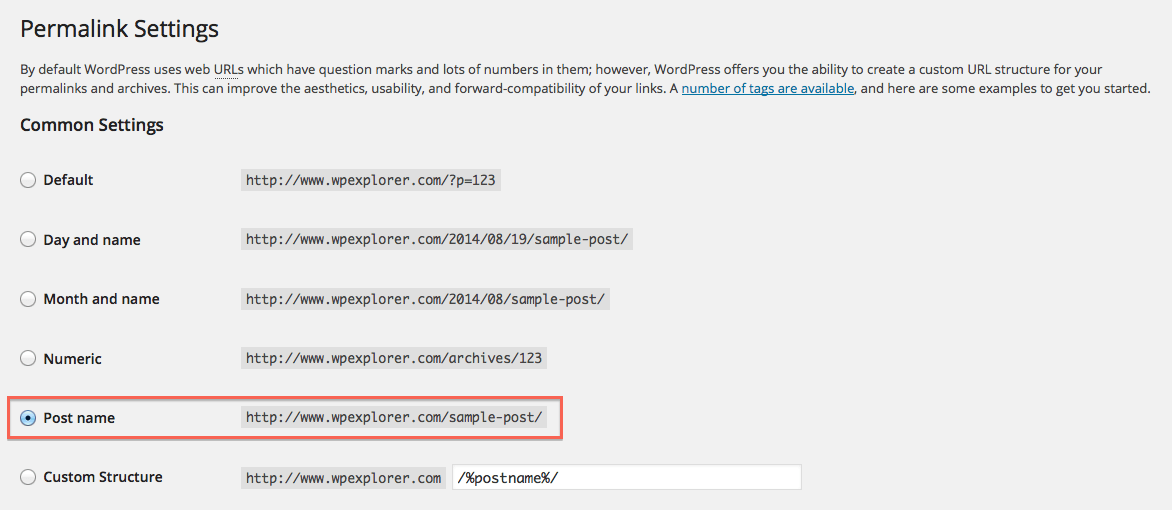
As you can see, permalinks are set to the post (or page) name. This is the format I would generally recommend. You may wish to add the date to your permalink if content on your site is in some way date-relevant (such as a news articles). But for most blog using the post name makes the most sense.
Once you have set your permalink structure correctly, you will want to make sure that each of your posts’ permalinks are are well-optimized for the specific keywords you are targeting. For instance, here’s the auto-generated permalink for a post about the best WordPress SEO plugins:

As you can see, it’s just the whole title – not very user or SEO friendly. Instead, you can click the “edit” button to shorten your permalink like so:

It does not simply reflect every word in the title. Instead I have amended it to focus on just the most important keywords in the headline, which will be useful for Google when it comes to interpreting relevancy.
2. Not Optimizing Your Post’s SERPs Presentation
I mentioned at the beginning of this post that using a SEO plugin for added functionality is a must and in this case Yoast is one of the best you can choose. Of the many reasons I consider the Yoast SEO plugin so invaluable is its per-post/page optimization options.
Here’s a screenshot of what Yoast’s post options look like (note we use Yoast Premium though there is a free version you can try with a more limited set of features):
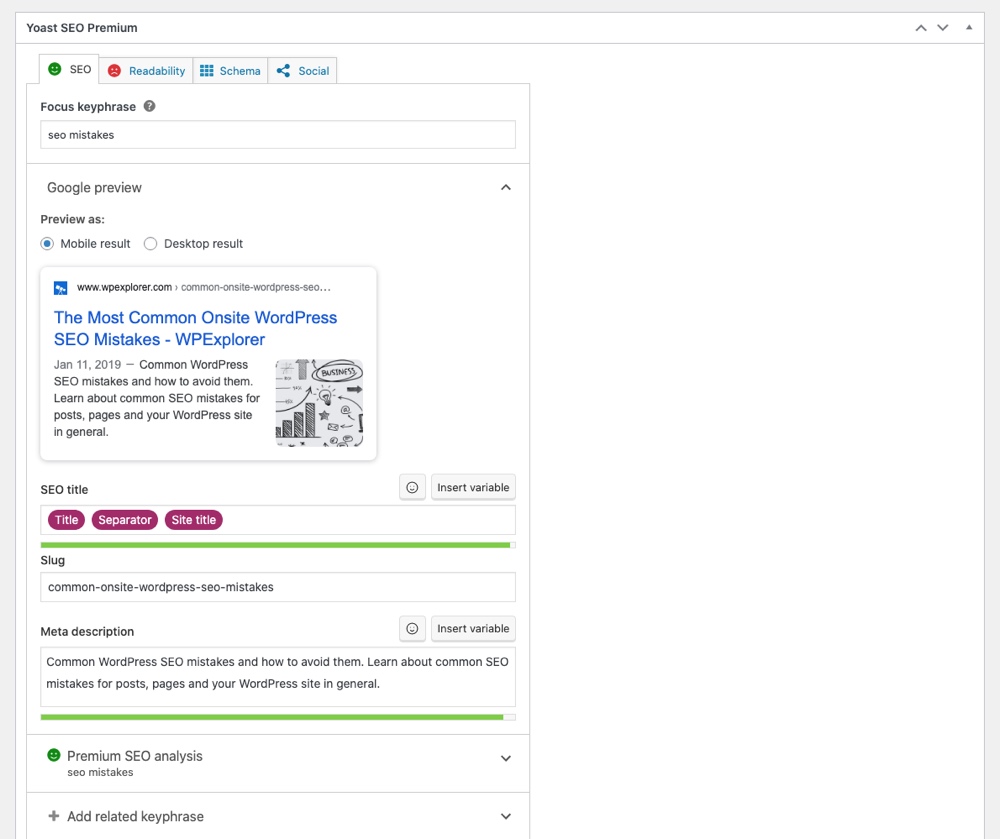
If you’re not optimizing your posts and pages by filling in the fields above, you’re missing out on a few tricks:
- The Focus Keyphrase allows you to assess how well optimized your post/page as a whole is for your primary keyword (and synonyms)
- The SEO Title allows you to adjust your title (as opposed to the headline within the content itself) to be more search engine friendly. Here you can create an optimized title for your post manually, or instead use variables which is I would recommend. For example you could include your “Title” which is the heading you created for your post, your “Separator” which can be defined in the Yoast plugin settings for Search Appearance, and the “Site Title” which is the official name of your website to create an informative and SEO friendly title.
- The Slug is a secondary area to edit your post or page url.
- The Meta Description allows you to create a manual description for your page/post. This will display in SERPs as well as in other places (such as social media sites). By default WordPress will use the first 55 words of your post as the excerpt, which may not always tell the whole story of what your post is actually about. So using this feature to write a manual description can be beneficial and have a dramatically positive effect on click through rates.
To make things even easier, Yoast uses an intuitive red-yellow-green color coded system. So just make sure that each page and post on your site shows green lights to know that it is edited optimally for display in SERPs.
3. Poor Interlinking
There are a number of benefits to linking between blog posts on your site. This can include things such as lower bounce rates or increased user engagement. But for SEO purposes we are concerned with relevance.
Put simply, if Google sees that you are internally linking to contextually relevant pages within your site, they are going to better understand your site’s relevancy to a particular topic as a whole. Effective interlinking can demonstrate the relevancy of a particular page to a topic. But that’s not all. It can also result in an overall increase in rankings across an entire topic (as your site is recognized as an authority).
The key is to interlink your own content often (but only when relevant) and to use keyword-rich anchor texts. Instead of “to learn more, click here“, write “learn more about dog training“.
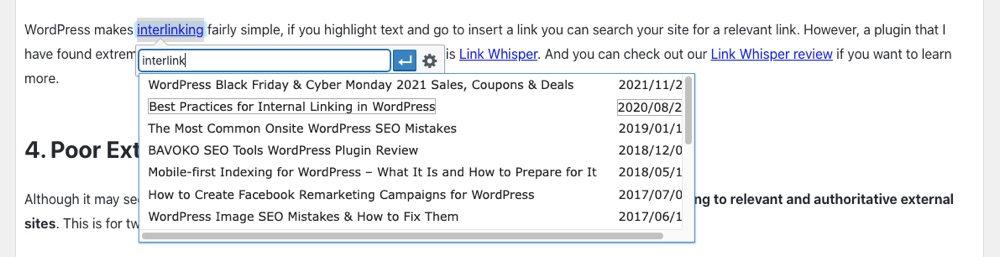
WordPress makes interlinking fairly simple, if you highlight text and go to insert a link you can search your site for a relevant link. However, a plugin that I have found extremely useful in making interlinking quicker and easier is Link Whisper. And you can check out our Link Whisper review if you want to learn more.
4. Poor External Linking
Although it may seem counterintuitive, you can positively affect your search engine rankings by regularly linking to relevant and authoritative external sites. This is for two reasons:
- The relevancy factor as discussed in the interlinking section above.
- Google likes to see sites refer to others – in the same way that a medical journal cites other studies.
Put simply, if your site doesn’t link to external sites, Google will take that as a sign that your content is not particularly valuable. So make sure that you are regularly linking out to relevant and authoritative websites and blogs in your niche. For example, we consider Yoast an authority on all things WordPress SEO and they have a great article on why outbound links matter.
Forgetting to Add Correct rel= to Links
When adding internal or natural outgoing links you don’t have to do a thing. But there are three instances where you should make use of rel attributes to be sure your SEO doesn’t get knocked.
First, when you are paid for an outbound link you are required to add a rel=”sponsored” per Google’s guidelines. This applies to any link you may ever be paid for and includes affiliate links. While you should be using an affiliate or ad disclosure to make readers aware that you’re getting paid, this rel is a quick heads up for Google.
Second, when linking to a site with a low domain rank or that might be a tad bit on the spammy side (I’m looking at you recipe blogs with 100 adverts and popups) use rel=”nofollow”. This tells Google not to pass any page rank to the link.
And the last you should implement is rel=”ugc” which stands for user-generated-content. This is often a good choice for comments sections or forums so Google know that they were not added by the site owners.
5. Poor Image Optimization
When it comes to common WordPress SEO mistakes, one I see most often is poor image optimization. Search engines cannot see text in image form, so you need to hold their hand a little when it comes to media. That’s where the alt and title tags come in, as shown here in the WordPress media uploader:
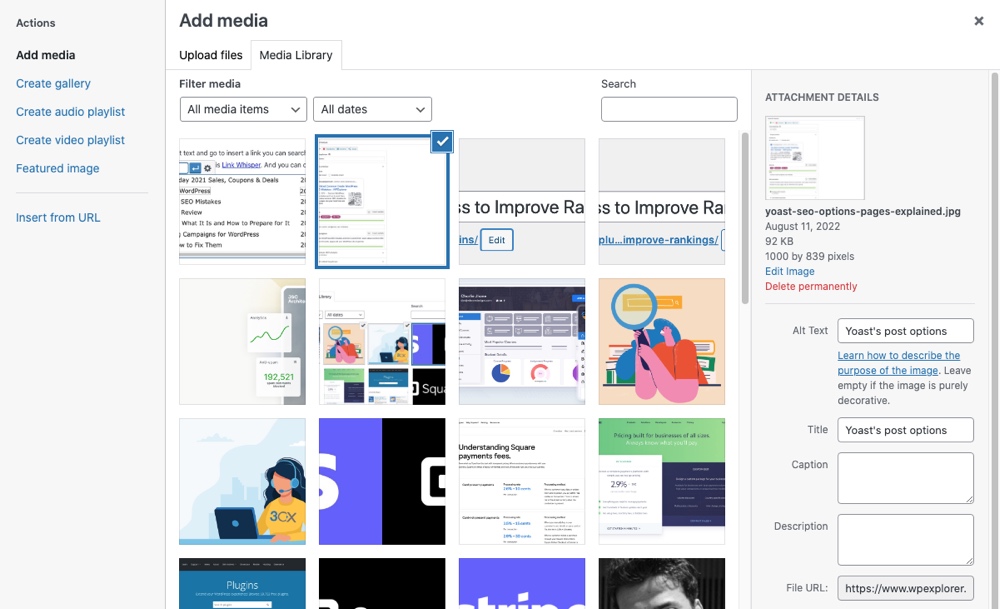
There is an endless debate in the SEO world as to how important alt and title tags are respectively. But rather than waste my time on that, I simply add text to both. When it comes to these tags you should focus both on SEO and usability.
For many people (such as the visually impaired or mobile users), images may not be viewable, in which case they will see the alt text. Therefore, it should be descriptive of the image, whilst also focusing on keywords relevant to the content. Don’t forget to include alt and title text on logos, taglines, and any navigational images. They’re all useful for providing search engines with greater context as to the subject of your site. But the is just the tip of the image of an iceberg. You can use this guide on how to optimize images to learn about more ways to perfect image for speed and SEO.
Broken Images
Along with good looking and compressed images, do not forget to fix broken images. If you don’t have much content, make sure to browse your website from time to time. If you find a broken image take a second to fix it. But if you’re like us and have hundreds or thousands of posts that might not be a practical option.
For large sites we highly recommend using an SEO tool. For example, with ahrefs you can run a monthly site audit which will crawl your site and spit out a report of errors that need fixing. One of these is a “Page has broken image” error. So all you have to do is click on the link to the offending page, locate the broken image and swap it out.
6. Poor Categorization and Tagging
This is a real pet peeve of mine – pages that are associated with a huge number of categories and tags. How is a search engine supposed to make sense of a post that is associated with a wide range of keywords?
Categorize and tag selectively and specifically. You should have a very limited number of categories (generally less than 10, with certain exceptions), and a limited number of tags (perhaps no more than 50). If a category of tag has only been used a handful of times, it probably isn’t worthy of existence.
I also recommend to keep it simple when it comes to WordPress posts and taxonomies – less is more. On my own blog I link each post to just one category and a handful of highly relevant tags. This way, I produce contextually relevant taxonomy pages that Google sees fit to rank.
Well constructed category and tag pages provide search engines with a great deal of context.This way they can build up an idea of your site’s relevancy as a whole to a given topic, and they can also rank on an individual basis. If you do decide to put together quality category and tag pages, remember to make sure that they are set to be indexed. To learn more about best practice when it comes to categorizing and tagging you can learn more in our detailed guide to WordPress categories and tags.
7. Poorly Structured Headers
HTML headers (e.g. the <h1> tag) provide Google with a lot of context pertaining to the relevancy of your site. Words placed within header tags are weighted more heavily than those contained within the main content on your site.
As such, it is vitally important that you include relevant keywords within these headers whenever possible, but it is also important that your header tags are structured appropriately. Some WordPress themes do not follow best practice in this regard, so you may want to check your header tags now. In brief:
- On your home page, the <h1> tag should be the name of your site.
- On all other pages, the <h1> tag should be the headline (i.e. of the specific post/page/archive).
That way, your homepage has the best chance of ranking for your site’s name, and other pages have the best chance of ranking for whatever specific topic they are covering.
Furthermore, <h2> and <h3> tags (and all the other Hs after that) should be free for use as contextually relevant sub-headers. What your theme shouldn’t be doing is using those tags for wasteful purposes (e.g. for the headline “recommended posts” in a sidebar widget – that does not help the search engines at all). For further information on how to correctly structure header tags, check out this in-depth post by Joost de Valk.
8. Instructing Search Engines to Index Too Much
A lot of people make the mistake of assuming that Google will crawl and index their entire site. Whilst Google may crawl your entire site, it often will not index all of the posts and pages. And in reality, you don’t actually want Google to crawl all of the content on your site – only the stuff that is actually worth ranking. Anything else is superfluous and does you no benefit being in Google’s index. Specifically, such pages include:
- Unused taxonomy/archive pages (e.g. tags, author archives, date-based archives, etc.)
- Your privacy policy
- Legal disclaimers
You get the idea. The “cleaner” a site you can present to Google, the better. Anything that is irrelevant or useless to searchers only serves to dilute your site’s relevancy. As such, you should ensure that all such pages are set to “noindex” – i.e. tell search engines not to index it. This is easily done with a plugin such as Yoast SEO, which allows you noindex entire taxonomies/archive types.
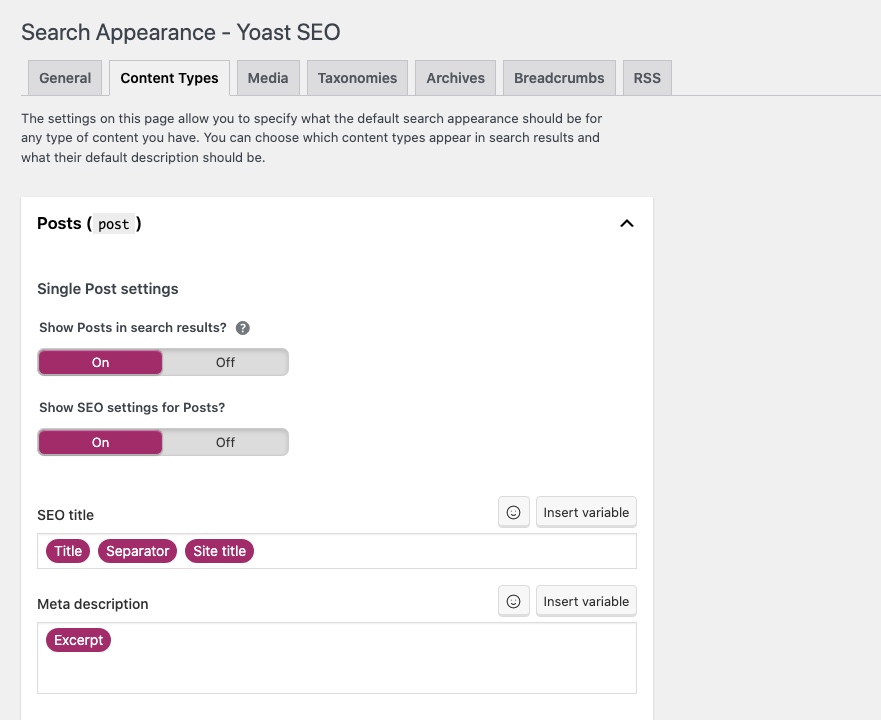
With the plugin installed, just go to SEO > Search Appearance. Then toggle the option for “Show (Post Type) in search results?” to No for each post type you’d like to noindex. Then head over to the Taxonomies and Archives tabs to do the same.
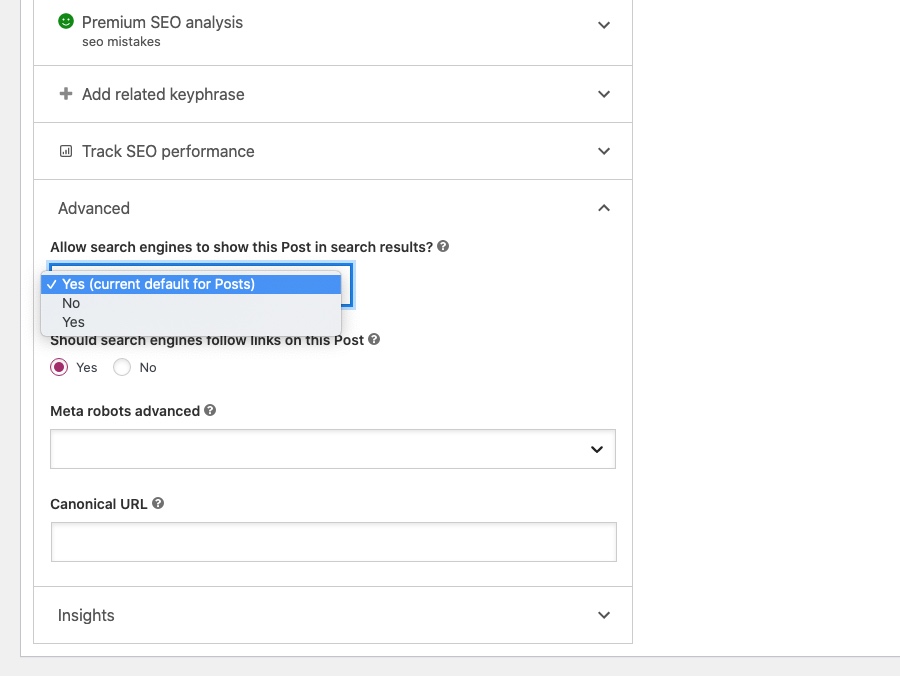
This option is also available on a a per post or page basis:
9. Not Providing an XML Sitemap
An XML sitemap is by no means necessary. But not providing one for search engines is like giving someone complicated directions to your house verbally, rather than your address. It’s a lot easier for the search engines if you tell them what should be indexed. This way Google, Bing, and others know what out of your indexed pages is most important.
The greatest sin of not providing an XML sitemap is the fact that it is so darn easy to do. If you already have the aforementioned Yoast SEO plugin installed, just go to SEO > General > Features and toggle On the XML sitemap functionality:
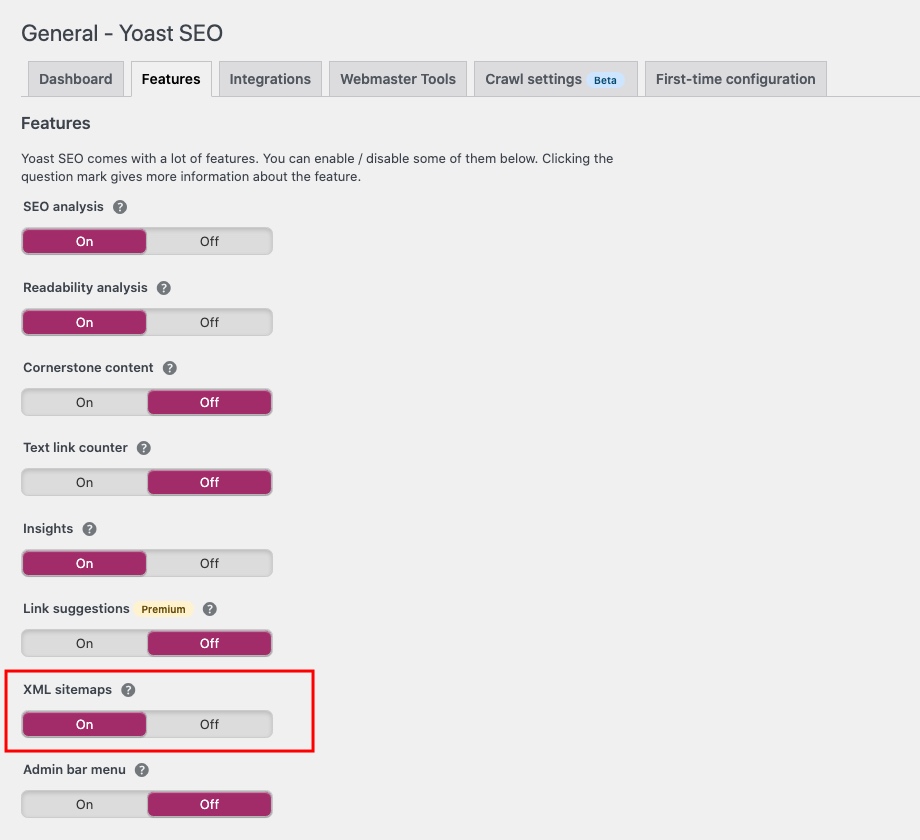
That’s all there is to it. Yoast will base you sitemaps on the various options you enable/disable under the Search Appearance section. The plugin will now keep a dynamically updated XML sitemap on your server for the search engines to use when crawling your site.
10. Focusing on Meta Keywords
This is less a mistake and more a complete waste of time, because Google does not consider meta keywords when ranking sites. Meta keywords have been historically used by spammers to such an extent that Google now apportions no value to them. So if you are still using meta keywords, now is the time to stop.
11. Not Focusing on LSI Keywords
LSI stands for Latent Semantic Indexing, and these are supporting words or phrases for your keyword. Google is no longer laser focused on specific keywords, but rather page content as a whole. So if your goal is to rank for “best homemade spaghetti” you should probably have words like pasta, boil water, meat sauce, al dente, parmesan or other keywords to signal that your post is truly about making homemade spaghetti.
12. Duplicate Content (and Not Defining Canonical URLs)
A lot of people will tell you that duplicate content is your worst enemy. If Google sees you publishing content that is available elsewhere it will unleash holy hell on your site until there is nothing left but some garbled HTML.
In reality this is not necessarily true. Google does not (always) penalize sites for using duplicate content. Instead, if it sees two webpages with largely the same content, it will try to figure out which one was the original publisher. Then it will prioritize that page in search results over the other.
On the other hand, duplicate content on the same site is not great. While not a world-ending issue, having multiple instances of the same content present on multiple pages is just plain messy. Having twenty “Bluehost Review” articles will not help you rank on the first page. Do your best to combine duplicate blog articles and redirect removed posts/pages to the most relevant one (again, Yoast SEO comes in very handy with it’s built-in redirection manager).
And perhaps far more prevalent than you might think are accidental duplicate pages Your site’s homepage may exist in both www and non-www (i.e. https://yoursite.com/) as well as http and https versions, which are in fact separate pages. The solution is to define what is known as canonical URLs for each of your site’s web pages.
13. Leaving Thin Content
Here’s the thing – having FAQs or documentation that is a paragraph or two is just fine from a functional perspective. But if you have a blog post you want to rank you’re going to need something meatier.
The most referenced study was performed by now defunct SerpIQ way back in 2012, and even back then they determined that to rank in the top 10 of search results posts needed to be at least 2,000 words. So considering it’s been 10 years, I think it’s safe to say you should adjust for inflation and probably aim a bit higher. Today 2,500-3,000 words seems to be a safe bet for search result (and social sharing) friendliness.
Don’t Neglect Readability
On one hand we’re saying to create long form content, but also don’t overwhelm your readers with content. Present your post in a way that it’s easy to read. Use a table of contents (like we did in this post) to quickly direct readers to the answer they’re looking for. Or break up long chunks of text with clever (and shareable) infographics to summarize key points.
14. Not Optimizing for Speed
Your site’s load speed is of vital importance. People hate sites that are slow to load, and by extension, so does Google (and probably other search engines). Put simply, the speed at which your site loads can actually have an impact on your rankings.
As such, you should ensure that your site loads in double quick time. There are plenty of guides on how to speed up WordPress, as well as optimized WordPress hosting and caching plugins you can use to help.
15. Not Optimizing for Social Media
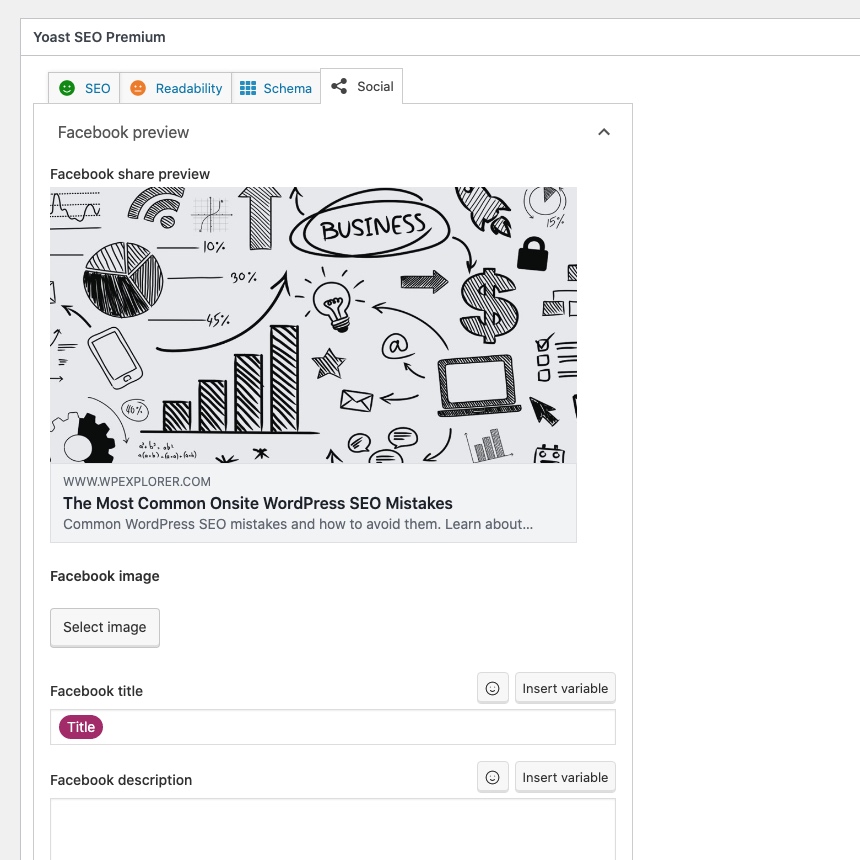
Whether you like social media or not, you should make sure that your profiles are correctly set up and linked with your WordPress via Open Graph and Twitter Cards. If you haven’t guessed yet, Yoast SEO is a quick and simple way to do this as social settings are built into the plugin.
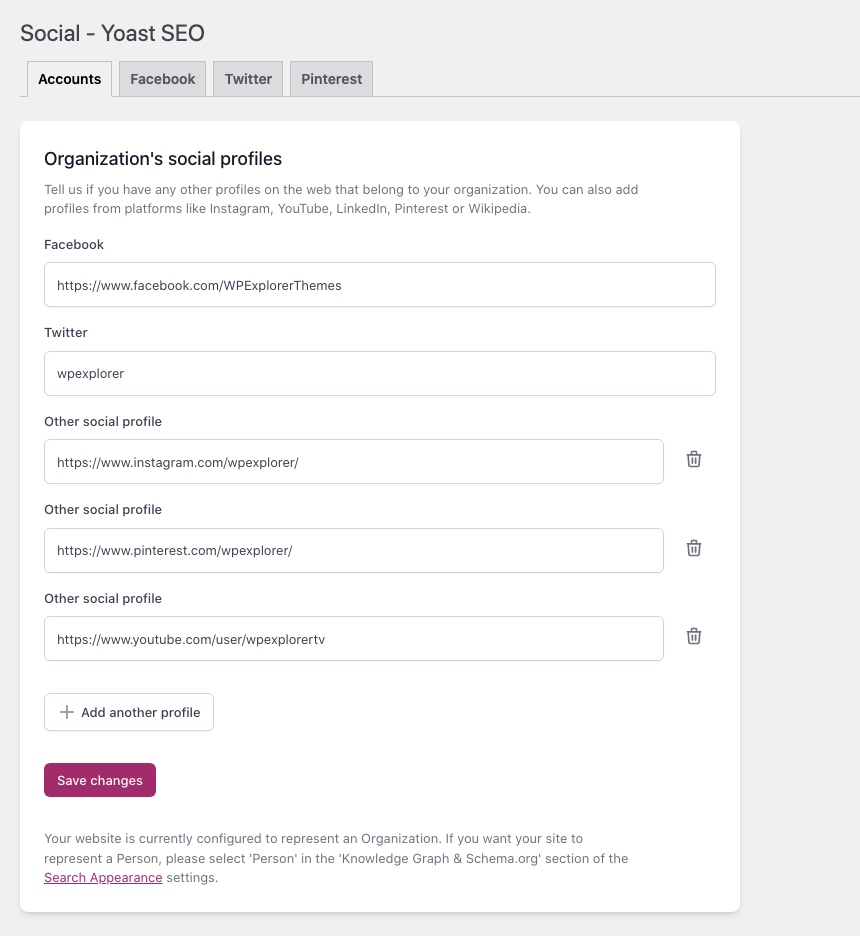
It may seem like a relatively minor thing but making sure your site is correctly linked to your social media will help ensure your posts are more “shareable.” In addition, with Yoast you can add your own custom Facebook and Twitter meta tags. This includes a title, description and optimized image. Again, this can help improve your post’s visibility and sharing.
16. Never Ever Updating
So you created an awesome post that ranks – congratulations! But now’s not the time to sit back. SERPs are constantly evolving, and you might not rank the same forever (or even for an entire month). Set up a keyword report to keep an eye on ranking content, and pay attention to competitors. Then makes updates to your content and SEO strategy accordingly.
Wrapping up Common Onsite SEO Mistakes
SEO can be rather intimidating – there is a lot to get wrong. But the flip side of this is that if you can get most things right, you’ll have a big advantage over the competition. Most of the WordPress SEO mistakes you see above aren’t rocket science. Plus once you understand the basic principles of SEO, you will be able to intuitively spot when something is good for your site’s rankings, and vice versa.
Do you have any onsite SEO tips for WordPress users that I have not covered either in this post or the other? If so, please share with us in the comments section!



This is a great post Tom. A lot of people just starting out with their sites will greatly benefit from it. The very first thing I do when I start a new WP site is install WordPress SEO by Yoast 😉
Yep — I think if I was stuck on a desert island and could only have one plugin, that would be it 😉
Ha! You better hope you can pick up some WiFi, too. In all seriousness, Yoast’s WordPress SEO blows any other SEO plugin out of the water. Great article! Looking forward to the next installment in the series.
As always a great post by Tom! I would just add a comment: write for humans and not for robots. Too many people think that optimizing content for robots (Google!) will improve their SEO, but that’s false. Never think you are more intelligent than Google, that’s a huge mistake. Even if some techniques works for some weeks or some months, one day the wheel turns…
Absolutely Remi. I preach a concept that I call “incidental SEO” — the idea being that you write for humans, but by extension what you are doing is beneficial for search engines too.
Cheers,
Tom
I think we can mention site speed also. Because it is related to SEO and it is onsite. For WordPress there are methods for speed. One is cache and the other is gzip. I am not very experienced in cache but I highly recommend gzip. It is easy and very efficient.
Hey Eko,
Part I covers issues relating to specific pages. Part II mentions site speed 🙂
Cheers,
Tom
Love the info here especially on images, confirms I was doing it right, but wasn’t sure if both should be the same. I’ll have to bookmark this one to remember in the future. Thanks Tom.
No problem Lisa 🙂
I have seen several websites with not so friendly URLs like domain.com/r84fufqjf
The worst thing is that they use WORDPRESS. Hope they can read this post and change their link structure. It’s not all about SEO, it’s about user experience and MUCH MORE.
You make this topic very clear to me! Waiting to hear more on this topic from you.
Stay tuned Akash!
Thanks Tom for the great post,when i starated my first website, i was using all in one seo but since using seo by yoast my site now does great on search engine. Is it ok to use the seo friendly images plugin to add the alt tag or better to be add manually?
I would recommend that you add manually Lateef.
the new media uploader that WP put in effect this past week seems to have taken away the title and alt text boxes. Maybe I’m doing something incorrectly since they changed it, but I can’t figure out how to title the images to optimize them like I did a week ago.
Any ideas?
Hey Karen, looks like you are using the free WP hosting? It’s pretty easy to access these settings, have a look here for the details
Hi Tom,
Great post and accompanying images 🙂 Everyone gets so hyped up about SEO and what works, they tend to overlook the more simple aspects that can make a difference. I just wanted to point something out/ask you a question. You mentioned the following:
“On my own blog I link each post to just one category and a handful of highly relevant tags.”
So that means the same post content is available by following multiple urls paths (i.e. the category and each individual tag). Wouldn’t this mean you are producing duplicate content on your website? You may cover this in the second post but I was curious to hear your thoughts!
Thanks and kudos for a job well done 🙂
Hi Mike,
First of all, I would always recommend that blog posts are only shown in full on the actual single post page — this circumvents the duplicate content issue altogether and I think it’s better for the user experience.
But in fact it’s not actually an issue anyway — Google officially stated years ago that they do not penalize duplicate content — they prioritize it. It’s not anything to worry about.
Cheers,
Tom
Hi Tom, Another great post, I also liked the part about the images confirmed what I though. And the inter linking is something I fail to do a lot, from now on it will be at the top of my list. Thanks 🙂
No problem 🙂
Isn’t it best that permalink should point to a specific page, e.g. /sample-post.html? And, most importantly should categories and tags have “no follow” attribute so that Search Engines don’t index the crawled content which would result in duplication? Thanks for your feedback!
Correct, that is the “post name” permalink structure Tom recommends…However, adding the .html isn’t going to do anything really to help SEO (that’s really old school). I would keep the .html out.
Regarding no-index for categories and tags it all depends on your website and also on the way your site is coded. For example I have some categories on this site such as the “Business WordPress Themes” category which I would definitely want people to be able to find via Google 😉
Now if your site is a very simple blog and updated only every once in a while then it might be best to no-index those. It depends mostly on how unique the content is on these pages.
If the existing permalink structure is *.html is there any benefit to changing to */?
Depends…if your site is already indexed with the .html then best to leave it (so you don’t have to redirect and potentially lose rankings) if the site is new, I would change it just because its easier and might be better for future compatibility. It should only have the .html in my opinion if it’s in fact a .html page, WordPress is PHP 😉
Hi Tom:
I greatly appreciate the blog post, which is a rather easy way to ensure folks are following the best SEO practices. The post is easy to follow and will come in handy. I can’t wait to put all of your advice to work on my website.
Many thanks,
Ron
I would like to say image size is one of the major issue for websites. Lots of sites have images that are far too big which slow down a page’s load time. Great post though!
Very, very true!
Hello,
Hope all is well, I run a few companies over in Manchester and work as a freelance web developer. I was just reading your piece about onsite WordPress SEO mistakes and I wanted to see if I could contribute to this, or perhaps another article, in some way.
I’ve been known to have my say in the Moz/Econsultancy/Search Engine Watch so I’m hoping you’ll give me a spot to write something fitting. Would love to chat more if you’re available in the next week? Let me know what you think.
Thanks, look forward to hearing from you,
Hi Alex! We’re glad you like the article 🙂 if you’d like to contribute head over to our Contact page. That’s where you’ll find our info.
Indeed a useful post about SEO mistakes, It’s best to learn from other’s mistakes than to feel the urge to commit one by oneself & then think of learning. I think we’ve all made some of these mistakes to some degree or another.
Choosing the wrong keywords during the keyword research was always a worst mistake I’ve done in the initial days.